

Share a Digital Passport
A Digital Product Passport (DPP) is the verifiable, shareable representation of your product data. Sharing one means selecting which data sections to include, generating a signed credential, and distributing it via QR code or link so anyone can independently verify your product's claims.
Understand passport composition
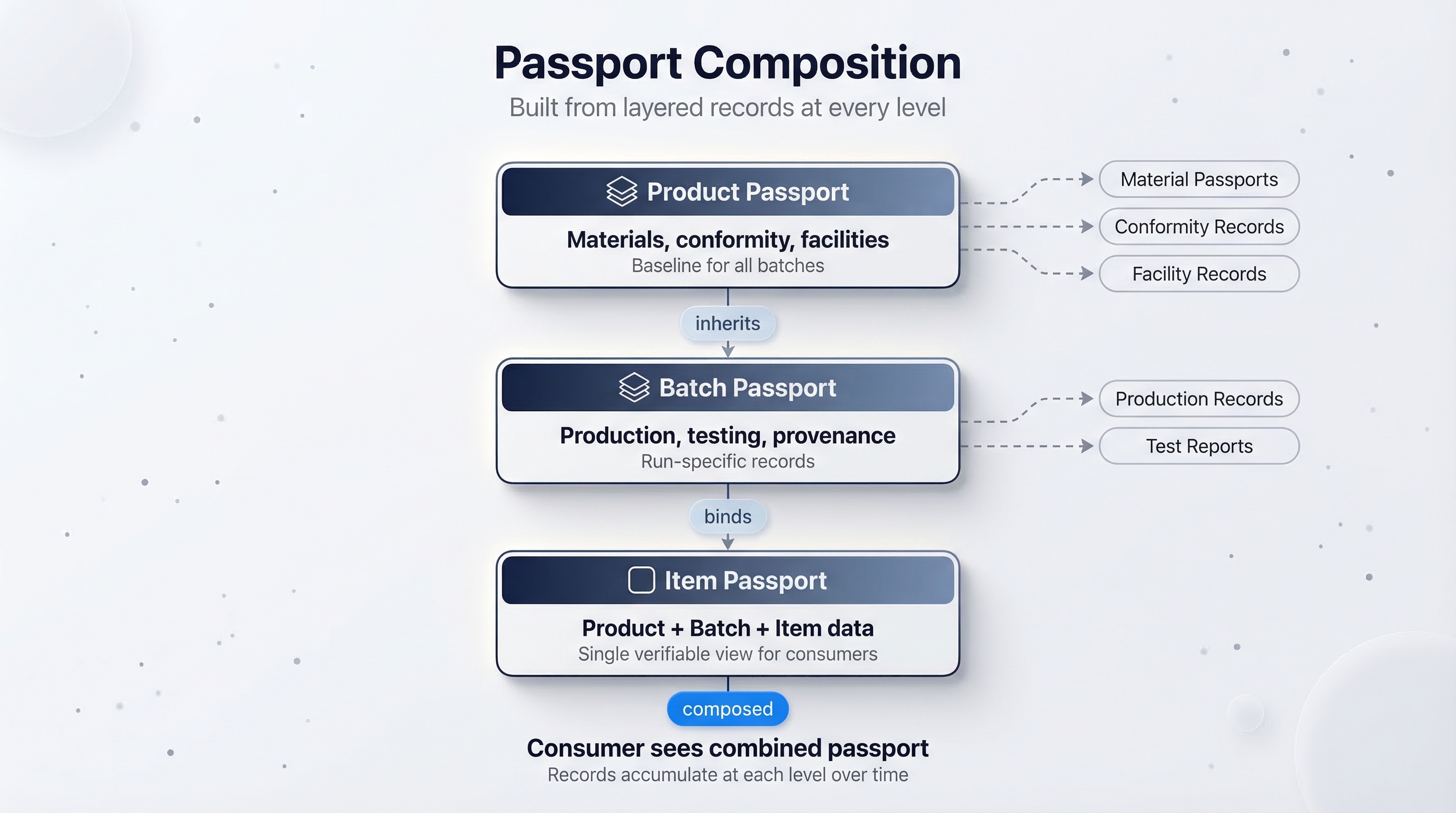
A passport exists from the moment a product is created and grows as you fill in data sections and attach records. Passports live at every level of the product hierarchy:
- Product passport accumulates material passports, conformity records, and facility records over time. It defines the baseline data shared by all batches.
- Batch passport adds production-specific records such as production records and test reports. Each batch inherits the product passport data.
- Item passport is the composition point: it binds product and batch data together into a single verifiable view that consumers see when they scan a QR code or open a link.
Tokenise the batch
Tokenisation freezes the batch's item list and anchors the current data on the blockchain. Each item in the batch receives a token tied to its dedicated identity.
- Navigate to your product, then open the Batches tab and select your batch.
- Click the Tokenisation tab.
- Review the summary — the platform shows what data will be anchored, how many items will be tokenised, and the estimated gas cost in LYX.
- Click Finalise Batch Items.
- Confirm the blockchain transaction. Your Universal Profile signs the transaction and broadcasts it to the network.
The transaction takes a few seconds to confirm. Once confirmed, the batch status changes to Finalised and a transaction hash is recorded on the Transactions page.
Once a batch is finalised, no items can be added to or removed from it. Batch and product data can still be updated, and the integrity anchor can be refreshed with the latest data (see Manage Compliance). Each anchor records a point-in-time snapshot, creating a verifiable history.
Share a passport
After finalising, you can generate a shareable passport with selective disclosure. You choose exactly which sections to include.
- From the product detail page, go to the Share tab (or navigate to the Share Passport page for the batch).
- You see a checklist of all data sections:
- Identification
- Physical Attributes
- Provenance
- Composition
- Circularity
- Documentation
- Check the sections you want to include in this particular passport. You might share full data with a regulatory body but only Identification and Provenance with consumers.
- Click Generate Passport.
The platform produces:
Click the Email button next to the generated passport to send the link directly to a recipient. This is useful for sending passports to retail partners or certification bodies who need to verify your claims.
What consumers see
What the consumer scans is different from the shareable passport described above. Consumers scan the Unique Product Identifier (UPI) — a QR code or NFC tag attached to the physical product — which allows them to claim ownership of that individual item. Once they scan the UPI, they land on the Universal Goods verification page. No account or login is required. The page displays:
- A visual passport with the product image, name, and the data sections you chose to disclose.
- A Verified badge if the credential's signature is valid and was signed by your organisation's Universal Profile.
- The issuing organisation's name and on-chain identity.
- A timestamp showing when the batch was finalised.
The consumer can also expand a Credential Details section to inspect the raw JWT and verification result.
Selective disclosure in practice
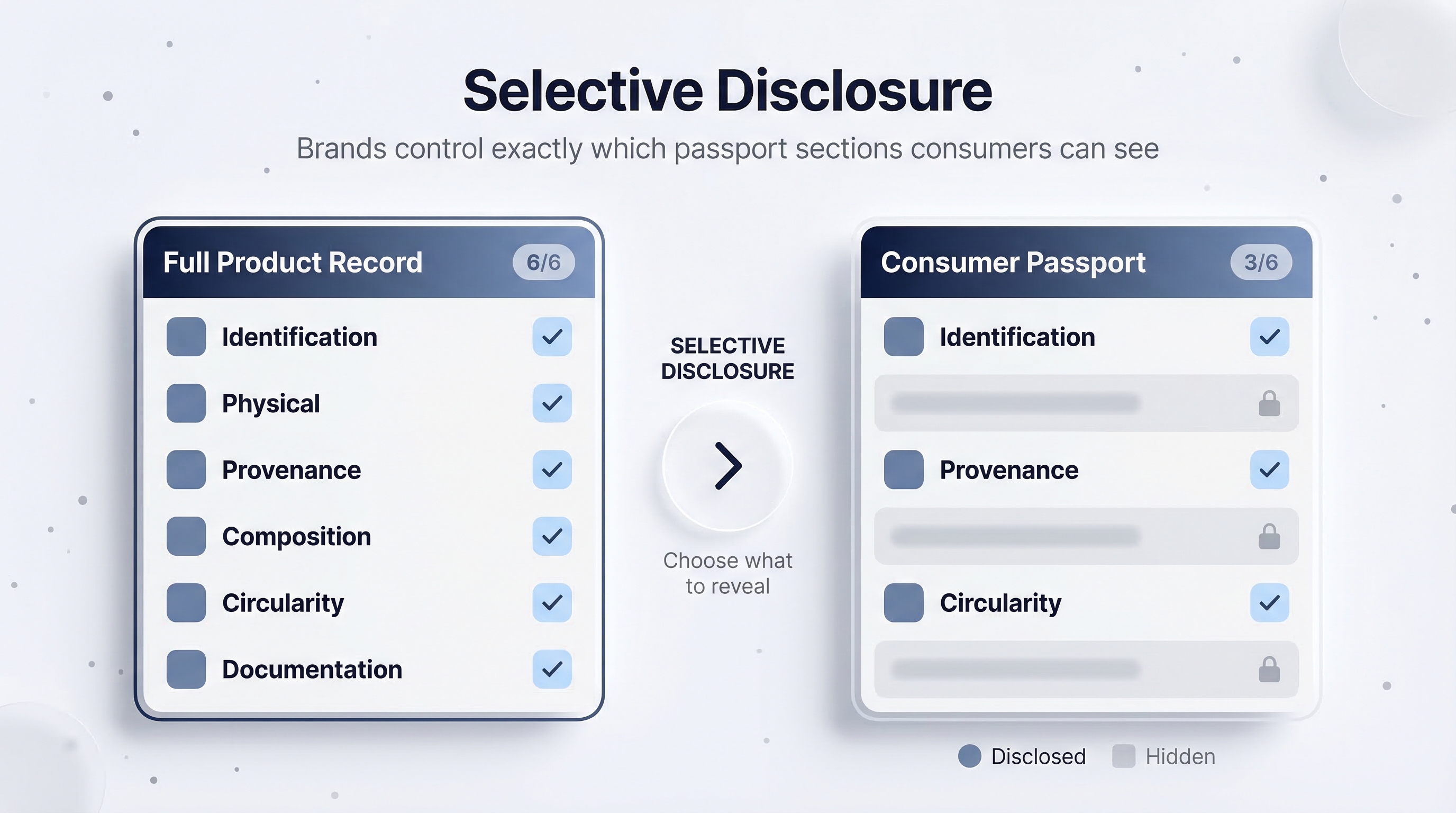
Different audiences need different levels of detail. You can generate multiple passports from the same finalised batch, each with a different selection of sections:
Each generated passport is a separate verifiable credential. Generating a new one does not invalidate previous ones.
Verify it yourself
After generating a passport, test it. Open the link in an incognito browser window (so you are not logged in) and confirm the verification page shows the correct data and a valid signature. See Verify a Product for a detailed walkthrough of the verification flow.
Next steps
Your product now has an on-chain identity and a shareable, verifiable passport. To build a trusted supply chain around it, continue to Connect with Partners.